Connecting Linux STBs to Ministra Pro
Set-top boxes (STBs) connect to a TV and allow end users to access content, for example, TV programs and VOD content such as movies and TV box sets.
Read about Infomir MAG STBs
To access content, an STB must be connected to the Ministra Pro portal in one of the following ways:
- The portal URL is specified in the STB software, and the portal loads automatically.
- The URL of the portal is manually added by the end user using the STB settings.
To manually connect to the Ministra Pro portal
After you provide an end user with the portal web address (URL), they can use the following procedure to connect their STB.
- In the STB, navigate to Settings.
- Select System settings.
- Select Servers.
- Select Portals.
- In Portal 1 name, enter the name of the portal.
- In Portal 1 URL, enter the web address of the portal.
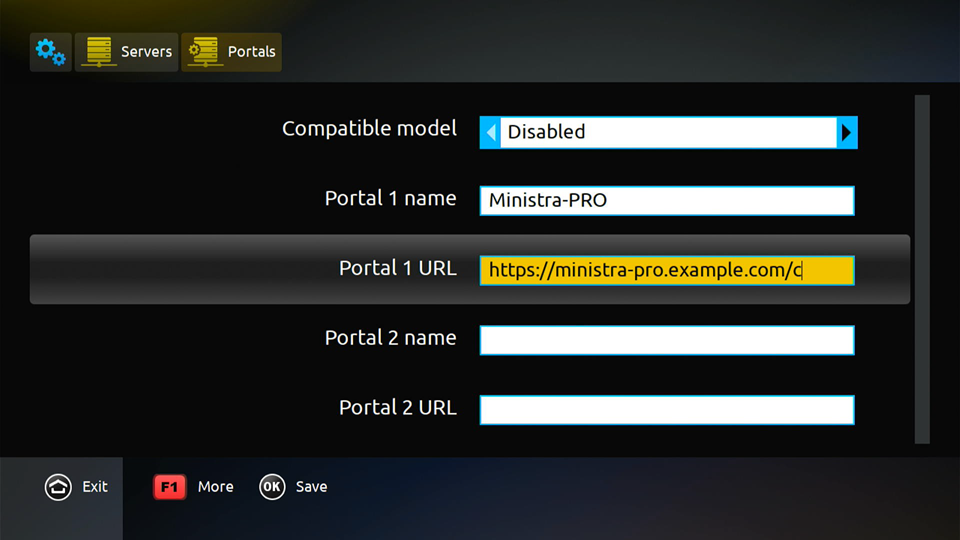
- Select Save.
- Select Exit, and navigate to the main menu.
- To check the connection to Portal 1, do the following:
- Navigate to Settings.
- Select System settings.
- Select Restart Portal.
- In the pop-up, select Yes.
The portal automatically loads.